Notedly

Save for Later

Found something on social media or the web you want to keep? Share it to Notedly. AI writes the title, summary and key points, files it in a folder, and makes it easy to find later.

Download on the App Store

For iPhone and iPad

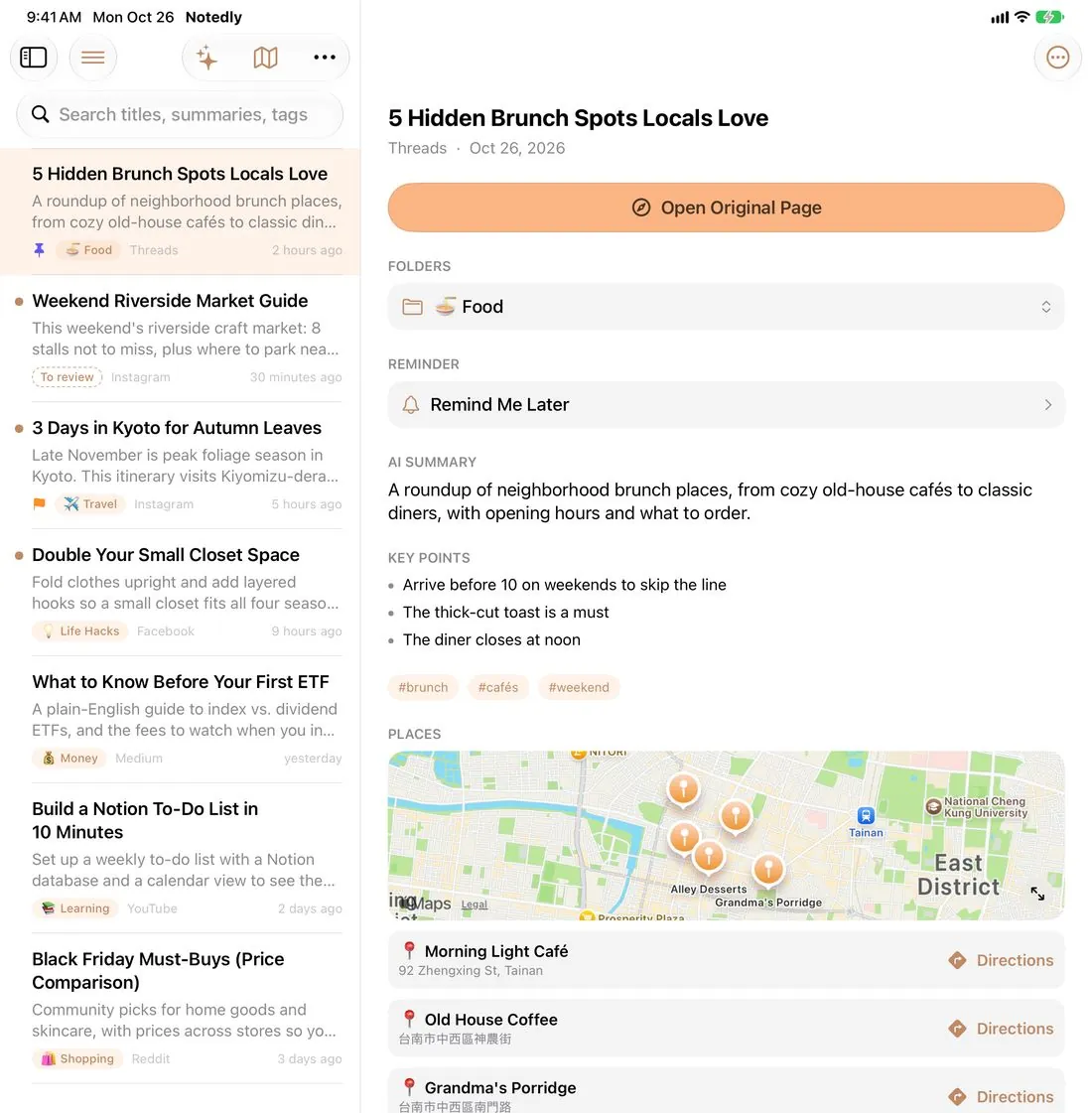
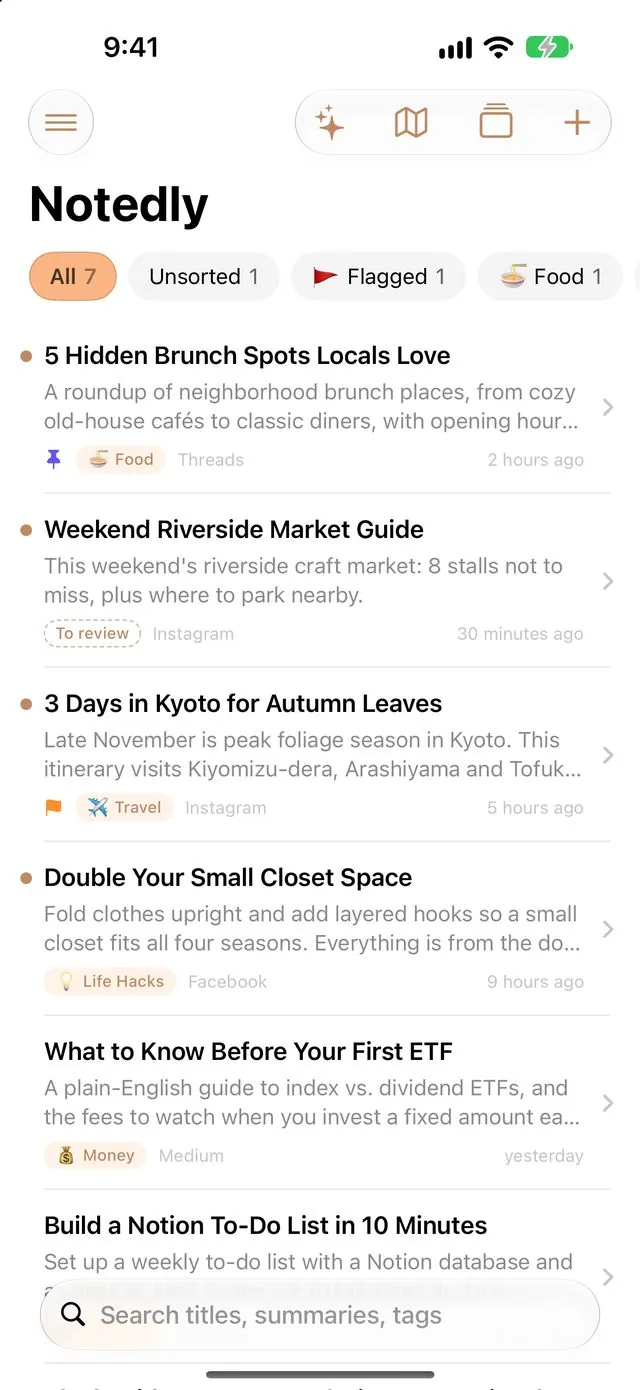
Notedly home screen: organized notes with folder tags and summaries Note page: AI summary, key points and tags
THREE STEPS

See it, share it, done

  1. 01

    Spot a post to keep

    Threads, Instagram, Facebook, YouTube, or any web page.

  2. 02

    Tap Share → Notedly

    No copy and paste. Just tap Notedly in the share sheet.

  3. 03

    AI organizes it

    It writes a title, summary, key points and tags, and files it in the best folder.

9:41
Feed⋯
🍳
Local Food Diary2h ago

5 hidden brunch spots locals love 🥪 From cozy old-house cafés to classic rice porridge. Get there before 10 on weekends to skip the line!

🥐
♡ 1,284💬 96Share ↗
💬Messages
✉️Mail
Notedly
📝Notes
Copy
Add to Reading List
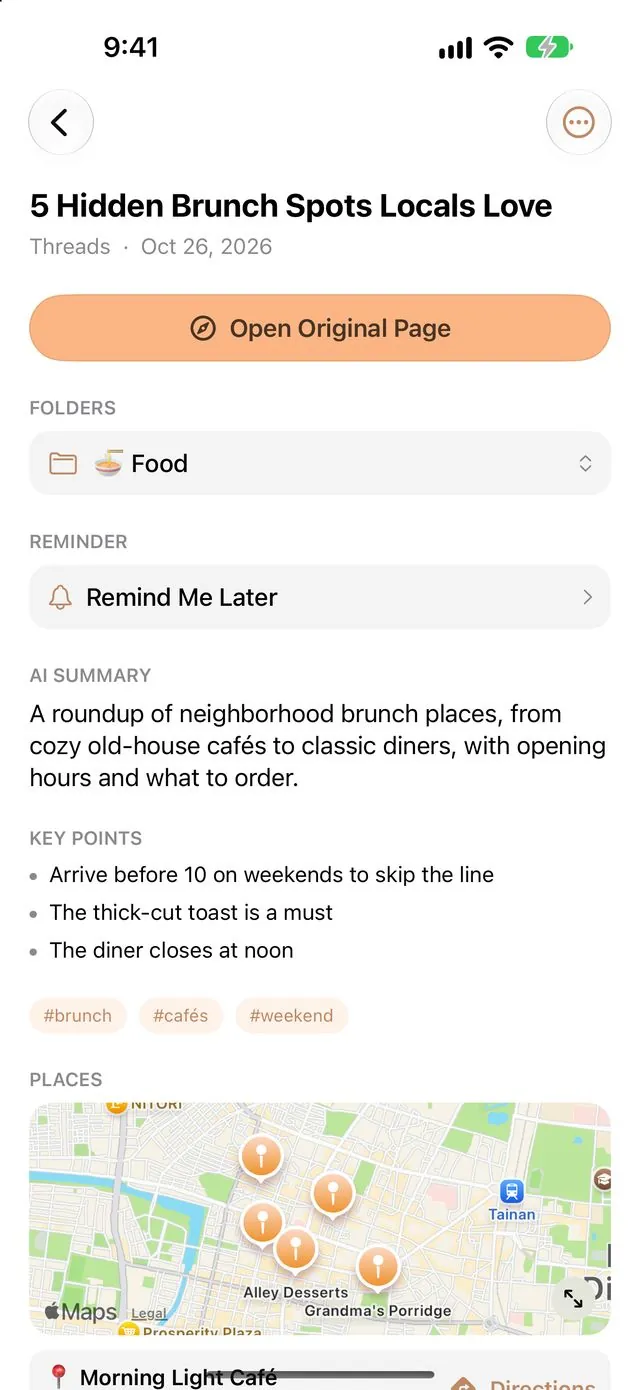
The organized note: AI summary, key points, tags and folder

No more screenshots. No more losing great finds. Whatever you want to keep, leave it to Notedly.

Features

Save fast. Find it later.

Drag or tap the arrows to spin the cards.

MORE FEATURES

Saved, and never forgotten

It doesn't just organize. It reminds you to come back and takes you to the place.

Save screenshots too

No link for a story or chat? Share a screenshot. Your phone reads the text on it and AI organizes it just the same.

Food & places map

Saved restaurants and spots appear on a map. See what's nearest, get directions in one tap, and get a heads-up when you're nearby.

Weekly review

A weekly reminder at the time you choose. Swipe through unread notes like cards so nothing you saved gets forgotten.

Ask your notes

Just ask, "Which brunch spots did I save?" AI answers from your notes and links the originals.

Home Screen widget

An unread note shows up on your Home Screen. Tap to open it and bring great finds back into view.

Move from other apps

Import files exported from other read-later apps, browser bookmarks or a list of links, and have them all organized at once.

NINE THEME COLORS

Make it your color

Tap a dot and the whole site changes color. The app works the same way, and even the home screen icon changes.

SYNC EVERYWHERE

Saved on your phone, ready on your iPad

Sign in with Apple or Google to sync automatically across iPhone and iPad.

Notedly on iPad: note list on the left, note on the right
iPhoneiPad
FAQ

You might be wondering

Does it cost anything?

No. Every feature is free, with no ads for now. AI summaries use Google Gemini's free tier, or Apple Intelligence built into supported devices. If you'd like to support development, you can buy me a drink in Settings → Support Notedly.

Which apps can I share from?

Almost any app with a Share button, like Threads, Instagram, Facebook, YouTube and Safari. If Notedly isn't in the share sheet the first time, scroll to the end, tap More and add it.

Why are some Instagram or Facebook summaries short?

Instagram and Facebook often block outside apps from reading the full post, so Notedly only gets the preview and the summary ends up short. If the share includes the post's text, or you share a screenshot instead, the AI can do a much fuller job.

Where is my data stored? Can others see it?

Without signing in, your data stays on your device. When you sign in, it's stored in Google Firebase to sync between your devices, and only you can see it. For details, see the Privacy Policy.

What's a Gemini key? What can it do?

A Gemini key (API key) is like a key that lets Notedly use Google's AI. You can get one free with a Google account and paste it into the app's settings. Once it's set, Notedly uses Google's Gemini to write summaries and key points, sort notes into folders, find places, and answer questions in Ask Your Notes. The free tier is plenty for personal use.

Do I need one? No. Without a key, supported devices use Apple Intelligence and others grab the page description.

What's Apple Intelligence? Who can use it?

It's the AI built into Apple devices. It runs right on your iPhone or iPad, with no internet connection and nothing to sign up for.

You need an iPhone 15 Pro or later, or an iPad with an M-series or A17 Pro chip, running iOS/iPadOS 26 or later. Turn it on in Settings › Apple Intelligence & Siri.

Gemini or Apple Intelligence: what's the difference?
GeminiApple Intelligence
What it isGoogle's cloud AIAI built into your device
CostFree tier, plenty for personal useFree
Getting startedGet a free key, paste it into the appTurn it on in Settings
DevicesAny iPhone or iPadiPhone 15 Pro or later, iPad with M-series or A17 Pro
Needs internetYesNo
SummariesMore detailed, handles long articlesConcise, shorter for long articles
Ask Your NotesYesNot yet
PrivacyContent is sent to GoogleStays on your device

In short: for more detailed summaries and Ask Your Notes, choose Gemini. If you'd rather not sign up, care most about privacy, and have a supported device, choose Apple Intelligence. You can also set up both: Notedly uses Gemini first and switches to Apple Intelligence when Gemini isn't available.

Note: on Gemini's free tier, Google may use what you send to improve its services, so for more private content we suggest Apple Intelligence.

How do I get a free Gemini key?
  1. Open Google AI Studio: aistudio.google.com/apikey (there's also a link in Notedly's settings).
  2. Sign in with your Google account. The first time, you'll need to accept the terms of service.
  3. Tap “Create API key”. If it asks you to pick a project, the default or a new one is fine.
  4. A string of letters and numbers starting with “AIza” appears. That's your key. Tap copy next to it.
  5. Open Notedly → Settings → Google Gemini and paste it into the “Paste API Key” field.
  6. Tap “Test Connection”. When you see “✅ Success”, you're done.

Tip: No credit card is needed. If you're asked to set up billing or upgrade, just skip it. Treat your key like a password and don't share it.

Can I bring my saves from another app?

Yes. Export your data from the other app (usually a CSV file) or export bookmarks from your browser, then choose the file in Notedly under Settings > Import from Other Apps. Links you've already saved are skipped, and AI organizes the rest in the background.

Does Nearby Alerts track my location all the time?

It's off by default and only works if you turn it on in Settings. When it's on, your iPhone only lets Notedly know when you're near a place you saved. Your location is never uploaded or shared.

Can I use it without signing in?

Yes. Every feature works; your notes just won't sync to other devices.

When can I download it?

Right now! Search for “Notedly” on the App Store, or download it here.

Great finds, saved for later

Get it free on the App Store.

Download on the App Store